I: Chuyển hướng 1 link duy nhất
1): Chức năng
- Chức năng là sẽ tạo một link fake, nếu không nhập link fake nó sẽ lấy link của sản phẩm hiện tại.
- Một link chuyển hướng, khi nhập link chuyển hướng thì người dùng click sẽ tự sang trang mới và trỏ về trang đích
2: Mã Function
a: Thêm tất cả cả code sau vào function:
// Chuyển hướng URL
function realdev_redirect_to_url() {
    $realdev_product_redirect_url_fake = get_field('realdev_product_redirect_url_fake');
    if ($realdev_product_redirect_url_fake) {
        echo '<div class=" urls-link" style="margin-bottom: 1rem;">
                <a id="urls-link" href="'.$realdev_product_redirect_url_fake.'" class=" button circle is-normal button-success">Xem Thực Tế</a>
              </div>';
    } else {
        global $product;
        echo '<div class=" urls-link ">
                <a id="urls-link" href="'.get_permalink($product->get_id()).'" class=" button circle is-normal button-successXem Thực Tế</a>
              </div>';
    }
}
// add_action('woocommerce_single_product_summary', 'realdev_redirect_to_url', 30);
add_shortcode('redirect_link', 'realdev_redirect_to_url ');

add_action('wp_footer', 'redirect_link_script');
function redirect_link_script() {
    global $post;
    $url = get_field('realdev_product_redirect_url', $post->ID);
    if ($url) {
        echo '<script>
            document.addEventListener("DOMContentLoaded", function() {
                var urlLink = document.getElementById("urls-link");
                if (urlLink) {
                    urlLink.addEventListener("click", function(event) {
                    event.preventDefault();
                    window.open("' . esc_js($url) . '", "_blank");
                    });
                }
            });
        </script>';
    }
}
b: Cài đặt ACF PRO (bắt buộc), và tiến hành truy cập mục Tools và Import mã JSON
c: Chèn shortcode vào nơi muốn hiển thị
Chèn mã sau: [redirect_link]
Vào vị trí muốn hiển thị cho người dùng Click
II: Sử dụng Multi link chuyển hướng.
1: Chức năng
- Chức năng chính là hơi khác mục bên trên, mục bên dưới này sẽ được sử dụng làm nhiều lần trên trang và hiển thị như một đường dẫn thông thường. Sẽ có link fake do mình tạo ra và khi người dùng click thì nó sẽ chuyển hướng đến link đích. Nếu làm AFF cực kỳ phù hợp vì nó sẽ giấu được link chứa mã AFF
2: Thêm mã vào function
// Chuyển hướng multi links
global $redirect_shortcode_counter;
if ( ! isset( $redirect_shortcode_counter ) ) {
    $redirect_shortcode_counter = 0;
}
function realdev_redirect_shortcode( $atts, $content = null ) {
    global $redirect_shortcode_counter;
    $redirect_shortcode_counter++;
    $atts = shortcode_atts( array(
        'id' => '',
        'url' => ''
    ), $atts, 'realdev_redirect' );
    $link = esc_url( $atts['url'] );
    if ( empty( $link ) ) {
        $link = esc_url( get_permalink( $atts['id'] ) );
    }
    return '<a id="realdev-redirect-' . $redirect_shortcode_counter . '" href="' . $link . '">' . $content . '</a>';
}
add_shortcode( 'redirect', 'realdev_redirect_shortcode' );
add_action( 'the_post', function() {
    global $redirect_shortcode_counter;
    $redirect_shortcode_counter = 0;
} );
function realdev_redirect_links() {
    if ( have_rows( 'realdev_redirect_link' ) ) :
        $links = array();
        while ( have_rows( 'realdev_redirect_link' ) ) : the_row();
            if ( $link = get_sub_field( 'realdev_redirect_link_list' ) ) {
                $links[] = $link;
            }
        endwhile;
        if ( ! empty( $links ) ) {
            echo '<script type="text/javascript">
                jQuery(document).ready(function($) {';
            foreach ( $links as $index => $link ) {
                echo '$("#realdev-redirect-' . ( $index + 1 ) . '").click(function(event){
                    event.preventDefault();
                    window.location.href = "' . esc_js( $link ) . '";
                });';
            }
            echo '});
            </script>';
        }
    endif;
}
add_action( 'wp_footer', 'realdev_redirect_links' );
3: Cách dùng
- Mỗi lần dùng thì sao chép mã:
- và dán vào vị trí cần hiển thị. Có một lưu ý là nó sẽ hiển thị như một thẻ link thông thường nên có thể sử dụng thoải mái trong việc chèn link
- Trong phần shortcode trên phần URL fake : link_customlà phần mình nhập vào. Ví dụ một link giảm giá chẳng hạn. Và phần Add Row click vào để thêm link.

Một lưu ý quan trọng là các shortcode sẽ hoạt động theo số thứ tự từ trên xuống, ví dụ shortcode link Fake đầu tiên tương ứng với Add Row link chuyển hướng đích đầu tiên, và tất nhiên cái shortcode thứ hai sẽ tương ứng với Add Row thứ hai.
III: Nâng cao
– Trong trường hợp muốn bọc link thì thêm mã tạo post type Go vào function
Mã function
//
function realdev_register_my_cpts_and_taxes()
{
    /**
     * Post Type: Go Links.
     */
    $labels = [
        "name" => esc_html__("Go Links", "realdev"),
        "singular_name" => esc_html__("Go Links", "realdev"),
    ];
    $args = [
        "label" => esc_html__("Go Links", "realdev"),
        "labels" => $labels,
        "description" => "",
        "public" => true,
        "publicly_queryable" => true,
        "show_ui" => true,
        "show_in_rest" => true,
        "rest_base" => "",
        "rest_controller_class" => "WP_REST_Posts_Controller",
        "rest_namespace" => "wp/v2",
        "has_archive" => true,
        "show_in_menu" => true,
        "show_in_nav_menus" => true,
        "delete_with_user" => false,
        "exclude_from_search" => false,
        "capability_type" => "post",
        "map_meta_cap" => true,
        "hierarchical" => true,
        "can_export" => true,
        "rewrite" => ["slug" => "go", "with_front" => true],
        "query_var" => true,
        "menu_position" => 10,
        "menu_icon" => "dashicons-admin-site",
        "supports" => ["title", "editor", "thumbnail", "excerpt", "trackbacks", "custom-fields", "comments", "revisions", "author", "page-attributes", "post-formats"],
        "taxonomies" => ["go_cat"],
        "show_in_graphql" => false,
    ];
    register_post_type("go", $args);

    /**
     * Taxonomy: Danh mục Links.
     */
    $labels = [
        "name" => esc_html__("Danh mục Links", "realdev"),
        "singular_name" => esc_html__("Danh mục Links", "realdev"),
    ];
    $args = [
        "label" => esc_html__("Danh mục Links", "realdev"),
        "labels" => $labels,
        "public" => true,
        "publicly_queryable" => true,
        "hierarchical" => true,
        "show_ui" => true,
        "show_in_menu" => true,
        "show_in_nav_menus" => true,
        "query_var" => true,
        "rewrite" => ['slug' => 'links-go', 'with_front' => true, 'hierarchical' => true,
        ],
        "show_admin_column" => true,
        "show_in_rest" => true,
        "show_tagcloud" => false,
        "rest_base" => "go_cat",
        "rest_controller_class" => "WP_REST_Terms_Controller",
        "rest_namespace" => "wp/v2",
        "show_in_quick_edit" => true,
        "sort" => true,
        "show_in_graphql" => false,
    ];
    register_taxonomy("go_cat", ["go"], $args);
}

add_action('init', 'realdev_register_my_cpts_and_taxes');
Sau khi tạo xong sẽ như này:
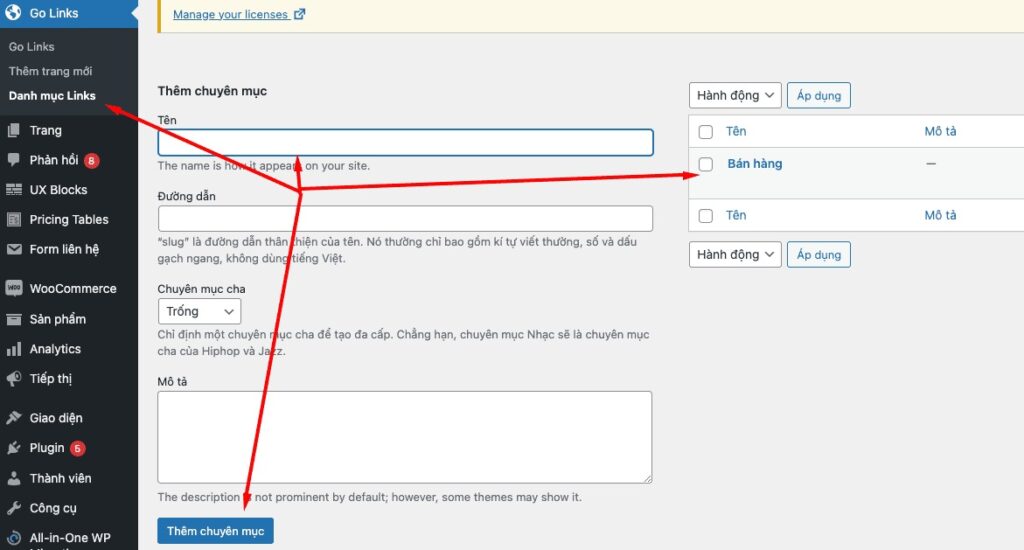
Thêm Danh mục giống bài viết, hoặc sản phẩm. Phần Thêm trang mới chính là trang bọc link để ngụy trang fake cho link chuyển hướng đích.
- Le Nuove Tendenze e Sfide del Gioco Online in Italia: Un’Analisi Approfondita
- Verlässlichkeit und Integrität im Online-Glücksspiel: Ein Leitfaden für klare Orientierung
- Czy Bdm Casino jest miejscem dla graczy high roller?
- Mastering the Art of Digital Baccarat: A Critical Analysis of Variations and Strategies
- Gestione Intelligente del Budget nei Tornei di Casinò Online: Confronto tra le Nuove Soluzioni di iGaming